
From Setup to Position, From Entry to Exit The Whole Trading Flow on a Single Platform.
Bilgin Trade analyses the coins on the market, detects the trading opportunities that form and delivers ready setups as instant notifications. When you pick a setup you like and press "Enter Trade", the position is opened automatically on the exchange linked through your API. Take profits, stops and the level moves required during the trade are managed automatically by the system.
Leveraged trading can lose your entire capital.
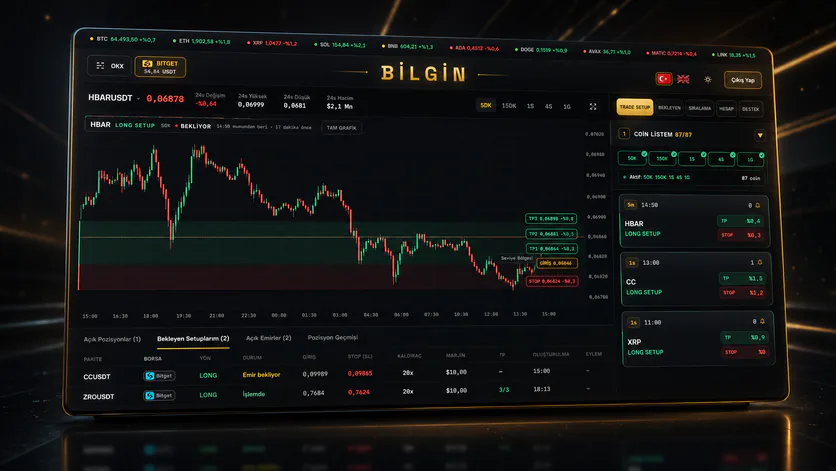
How does the setup system work?
Pick your coins, get your signalsTick the ones you want to follow from the live coin list that comes from the partner exchanges, and choose timeframes between 5M and 4H. Only the setups of the coins you picked, on the timeframes you picked, reach your screen.
Enter the trade with one clickEntry, TP1-TP2-TP3 and stop levels are ready on every setup card. When you press "Enter Trade", the position opens automatically on your API-linked exchange.
Risk under controlLeverage and margin limits are checked automatically; risk above 65% is not allowed once the stop distance is multiplied by the leverage. You can customise the TP distribution if you wish.
Transparent net P/L rankingThe ranking uses only the net profit/loss of real trades opened through Trade Setup, with commissions and funding deducted. You can join the ranking with your username if you wish.
How do I register?
Registration is done with the UID taken from a partner exchange. You are ready in 4 steps.1Open an exchange account with the referral linkPick one of the partner exchanges below and create a new account through our referral link.
2Get your UIDCopy the UID (user number) from the profile/account section of your exchange account. A UID consists of digits only.
3Register on Bilgin with your UIDEnter the UID of at least one exchange together with your email and password in the sign-up form. Your request is approved within 0-12 hours.
4Link your API, start receiving setupsAfter approval, link your API key on the account screen. From then on you can enter setups with a single click.
Important: the UID must be taken only from exchange accounts opened through the referral links below. UID requests from accounts without a referral are not approved.
Short Product Video
Opening the terminal for the first time: how to read a setup, place an order, and where protection lands.Partner exchanges
Open an account with the referral link, get your UID, use it while registering.How is it used?
The order to follow once you are inside the terminal.1
Build your coin listPick the coins you want to follow from the My Coin List panel at the top of the Trade Setup screen. Setups of coins you did not pick will not reach you.
2
Tick the timeframesChoose at least one of 5M, 15M, 1H and 4H. A separate setup is produced for every timeframe you pick.
3
Review the incoming setupThe card shows the side (Long/Short Setup), the timeframe, the TP and stop percentages and the number of people who placed an entry order for that setup. Clicking the card opens its chart.
4
Enter the tradeSet your leverage and margin (min $10, max $10,000), customise the TP distribution if needed and enter the trade. The panel stays open; you can drag it wherever you like.
5
Track your positionFollow open positions, open orders and position history from the bottom panel. The exchange you trade on is determined by the exchange selected in the top bar.
6
Join the rankingWhen you turn on the Join the Ranking switch in the left panel, you start appearing in the net profit/loss ranking with your username.